¶ All
¶ Activate Wifi
nmcli radio wifi on
¶ Rotate DSI screen with touch interface 180°
Append lcd_rotate=2 to /boot/firmware/config.txt
Then reboot
¶ Wait for network at boot
sudo raspi-config
System options/Network at Boot/Yes/OK
¶ Enable SSH before first boot
Mount raspberry SD card on any system
Create '''/boot/ssh''' file
Put SD Card in raspberry and boot
¶ Enable WIFI before first boot
Mount raspberry SD card on any system
Create '''/boot/wpa_supplicant.conf''' file
Put this inside :
ctrl_interface=DIR=/var/run/wpa_supplicant GROUP=netdev
update_config=1
country=US
network={
  ssid="SSID"
  psk="PASSWORD"
  key_mgmt=WPA-PSK
}
Put SD Card in raspberry and boot
¶ Installing tft 35
www.lcdwiki.com/3.5inch_RPi_Display
¶ Interface
| PIN NO. | SYMBOL | DESCRIPTION |
|---|---|---|
| 1, 17 | 3.3V | Power positive (3.3V power input) |
| 2, 4 | 5V | Power positive (5V power input) |
| 3, 5, 7, 8, 10, 12, 13, 15, 16 NC NC | ||
| 6, 9, 14, 20, 25 GND Ground | ||
| 11 TP_IRQ Touch Panel interrupt, low level while the Touch Panel detects touching | ||
| 18 LCD_RS Instruction/Data Register selection | ||
| 19 LCD_SI / TP_SI SPI data input of LCD/Touch Panel | ||
| 21 TP_SO SPI data output of Touch Panel | ||
| 22 RST Reset | ||
| 23 LCD_SCK / TP_SCK SPI clock of LCD/Touch Panel | ||
| 24 LCD_CS LCD chip selection, low active | ||
| 26 TP_CS Touch Panel chip selection, low active |
sudo apt-get update
sudo apt-get install -f
git clone https://github.com/waveshare/LCD-show.git
chmod -R 755 LCD-show
cd LCD-show/
chmod +x LCD35-show
NOTE: the waveshare drivers are display-specific. Please consult the manufacturer of your display for the video drivers and the install steps
sudo ./LCD35-show [rotation ex : 180]
This last step will reboot your system and you will need to SSH back in.
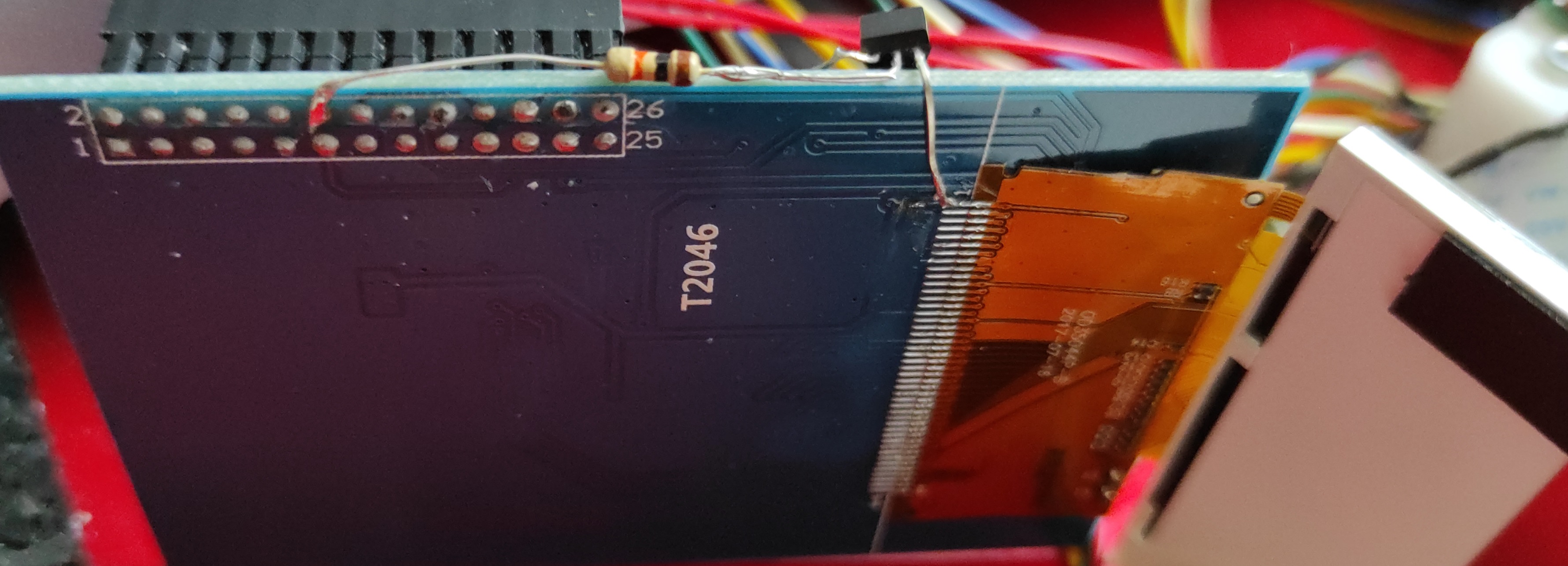
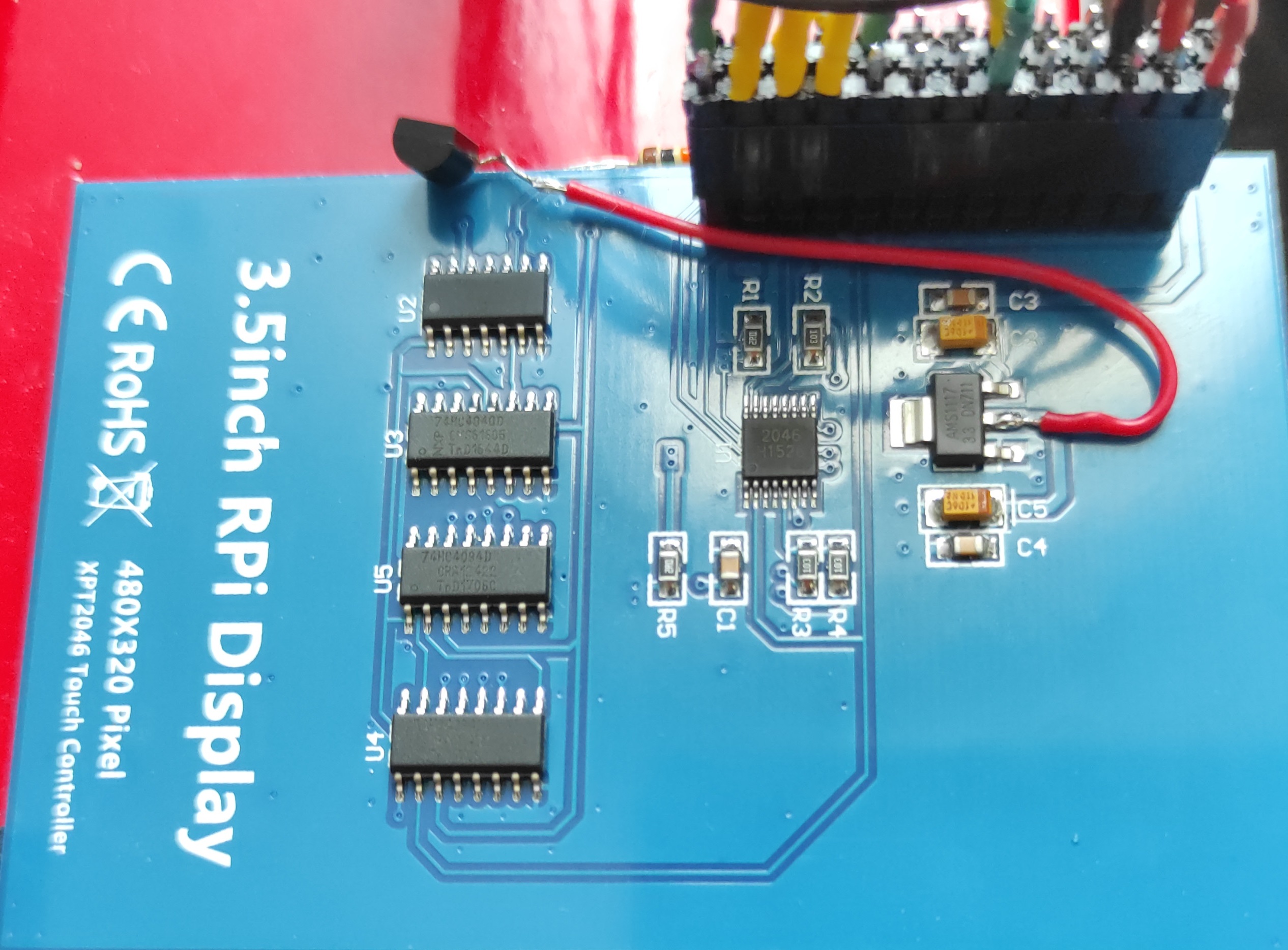
¶ Wiring to enable backlight PWM (3.5 inch LCD screen A)
Material :
- 1 resistor 1k
- 1 NPN Transistor (2N2222)
Wiring :
- Cut the trace nearby the flex connector pin 1 on the LCD module (direct from PNP to flex connector pin 1)
- Solder the base of the PNP via a base resistor (10k) on pin 12 (same as RPI PIN 12 = GRIO18/PWM) on the back of the connector
- Solder the output of the lm1117 which generates the 3.3V (the middle pin) to the emittor of the PNP transistor (red wire)
¶ Start/stop backlight on startup/shutdown
¶ Prerequisiste
sudo apt install python3-dev python3-rpi.gpio
¶ Script
vi /home/pi/lcd_backlight_control.py
#!/usr/bin/env python3

import RPi.GPIO as GPIO
import sys
from time import sleep


def main():
  value = check_args()
  ledpin = 12                             # PWM pin connected to LED
  GPIO.setwarnings(False)                 #disable warnings
  GPIO.setmode(GPIO.BOARD)                #set pin numbering system
  GPIO.setup(ledpin,GPIO.OUT)
  if value == "on":
    GPIO.output(ledpin,GPIO.HIGH)
  else:
    GPIO.output(ledpin,GPIO.LOW)


def usage(msg):
  print(msg, "lcd_backlight_control.py <on-off : display backlight>")
  sys.exit()


def check_args():
  if len(sys.argv) != 2:
    usage("[Error] Script take only one argument")
  if sys.argv[1] != "on" and sys.argv[1] != "off":
    usage('[Error] Value must be "on" or "off"')
  return sys.argv[1]


if __name__ == "__main__":
    # execute only if run as a script
    main()
chmod a+x /home/pi/lcd_backlight_control.py
¶ Service
sudo vi /etc/systemd/system/3.5_screen_backlight.service
[Unit]
Description=This service calls /home/pi/lcd_backlight_control.py upon shutdown or reboot.

[Service]
Type=oneshot
RemainAfterExit=true
ExecStart=/home/pi/lcd_backlight_control.py on
ExecStop=/home/pi/lcd_backlight_control.py off

[Install]
WantedBy=multi-user.target
¶ Enable Service
sudo systemctl enable 3.5_screen_backlight.service
¶ Start/Stop button with led
'''Pin 5''' for '''button input'''
'''Gnd''' on the other side of the switch
'''Pin 8''' for '''power LED output'''
Configure GPIO serial to led output and listen to io for start/stop
sudo vi /boot/config.txt
enable_uart=1
dtoverlay=gpio-shutdown
'''NOTE : I2C must be disabled to use default GPIO (3)'''
sudo reboot
¶ Backup sd card to image
sudo dd if=/dev/mmcblk0 of=[mount point]/myimg.img bs=1M
¶ [PiShrink] Create shrinked image of current booted image
¶ installation
sudo wget -O /usr/local/bin/pishrink.sh https://raw.githubusercontent.com/Drewsif/PiShrink/master/pishrink.sh
sudo chmod +x /usr/local/bin/pishrink.sh
¶ Usage
sudo pishrink.sh <image>.img
¶ Log2RAM
cd /home/pi
git clone https://github.com/azlux/log2ram.git
cd log2ram
sudo sh install.sh
Edit /etc/log2ram.conf
sudo vi /etc/log2ram.conf
change value SIZE=128M
sudo reboot
Check if log2ram is enabled
df -h
¶ Write to sdcard
sudo dd bs=4M if=~/SDCardBackup.img of=/dev/sdb
¶ Pi zero
¶ Install node
https://github.com/sdesalas/node-pi-zero
wget -O - https://raw.githubusercontent.com/sdesalas/node-pi-zero/master/install-node-v10.15.0.sh | bash