¶ Arret d'alimentation de machines automatique avec Home assistant/nodered/mqtt
¶ Linux
- Se connecter en ssh sur la machine linux.
- Installer le package mosquitto-clients
sudo apt update
sudo apt install mosquitto-clients
- Créer le fichier '''/opt/mqtt_send_status.sh'''
Dans le fichier entrer ce contenu et modifier les valeurs en fonction de l'attendu :
#!/bin/sh

/usr/bin/mosquitto_pub -h <ip ou hostname du serveur mqtt> -t "$1" -m "$2" -u "<utilisateur mqtt>" -P "<mot de passe mqtt>"
- Créer un nouveau service en créant le fichier : '''/etc/systemd/system/custom_machine_status.service'''
Dans le fichier entrer ce contenu :
[Unit]
Description=Send machine status to mqtt
After=network-online.target

[Service]
Type=oneshot
ExecStart=/opt/custom_nuke/mqtt_send_status.sh octopi2_status start
ExecStop=/opt/custom_nuke/mqtt_send_status.sh octopi2_status stop
RemainAfterExit=yes

[Install]
WantedBy=multi-user.target
- Activer et démarrer le service
sudo systemctl enable custom_machine_status
sudo systemctl start custom_machine_status
- Dans nodered charger ce json:
[{"id":"c78a38d046544054","type":"comment","z":"8bb86af5d9ff4efa","name":"Octopi auto power stop","info":"","x":140,"y":40,"wires":[]},{"id":"bc8a0a9df7c20d40","type":"mqtt in","z":"8bb86af5d9ff4efa","name":"","topic":"octopi2_status","qos":"2","datatype":"utf8","broker":"412e89f3c4981a13","nl":false,"rap":true,"rh":0,"inputs":0,"x":110,"y":100,"wires":[["8840fd68361f02b8"]]},{"id":"8840fd68361f02b8","type":"switch","z":"8bb86af5d9ff4efa","name":"","property":"payload","propertyType":"msg","rules":[{"t":"eq","v":"stop","vt":"str"},{"t":"eq","v":"start","vt":"str"}],"checkall":"true","repair":false,"outputs":2,"x":290,"y":100,"wires":[["613e5e53c9a95c52"],["af2420a075066b97"]]},{"id":"613e5e53c9a95c52","type":"delay","z":"8bb86af5d9ff4efa","name":"","pauseType":"delay","timeout":"5","timeoutUnits":"minutes","rate":"1","nbRateUnits":"1","rateUnits":"second","randomFirst":"1","randomLast":"5","randomUnits":"seconds","drop":false,"allowrate":false,"outputs":1,"x":540,"y":100,"wires":[["e6301d03267ebacc"]]},{"id":"af2420a075066b97","type":"function","z":"8bb86af5d9ff4efa","name":"Save last start timestamp","func":"let ts = (new Date()).getTime()\n\nflow.set(\"actopi2_start_ts\", ts)\n\nreturn {'payload': ts.toString()};","outputs":1,"noerr":0,"initialize":"","finalize":"","libs":[],"x":590,"y":180,"wires":[[]]},{"id":"e6301d03267ebacc","type":"function","z":"8bb86af5d9ff4efa","name":"Return ok if has to be stopped","func":"let old_ts = flow.get(\"actopi2_start_ts\")\nlet new_ts = (new Date()).getTime()\n\nlet diff = Math.round((new_ts - old_ts) / 1000)\n\nif (diff > 5 * 60)\n return {'payload': diff.toString()}\n\nreturn { 'payload': \"NOK\" + diff.toString() }","outputs":1,"noerr":0,"initialize":"","finalize":"","libs":[],"x":910,"y":100,"wires":[["8dcf6ce17a414971"]]},{"id":"8dcf6ce17a414971","type":"api-call-service","z":"8bb86af5d9ff4efa","name":"","server":"e0529c4.c13636","version":5,"debugenabled":false,"domain":"switch","service":"turn_off","areaId":[],"deviceId":[],"entityId":["switch.tasmota_5"],"data":"","dataType":"jsonata","mergeContext":"","mustacheAltTags":false,"outputProperties":[{"property":"enable","propertyType":"msg","value":"false","valueType":"str"}],"queue":"none","x":1200,"y":100,"wires":[["21ab5a9e727ea5e8"]]},{"id":"21ab5a9e727ea5e8","type":"ha-switch","z":"8bb86af5d9ff4efa","name":"Ocotpi_switch","version":0,"debugenabled":false,"inputs":1,"outputs":2,"entityConfig":"b7351b345836fc08","enableInput":true,"outputOnStateChange":true,"outputProperties":[{"property":"outputType","propertyType":"msg","value":"state change","valueType":"str"},{"property":"payload","propertyType":"msg","value":"","valueType":"entityState"}],"x":1430,"y":100,"wires":[[],[]]},{"id":"412e89f3c4981a13","type":"mqtt-broker","name":"MQTT","broker":"192.168.0.56","port":"1883","clientid":"","autoConnect":true,"usetls":false,"protocolVersion":"4","keepalive":"60","cleansession":true,"birthTopic":"","birthQos":"0","birthPayload":"","birthMsg":{},"closeTopic":"","closeQos":"0","closePayload":"","closeMsg":{},"willTopic":"","willQos":"0","willPayload":"","willMsg":{},"sessionExpiry":""},{"id":"e0529c4.c13636","type":"server","name":"Home Assistant","version":5,"addon":false,"rejectUnauthorizedCerts":false,"ha_boolean":"y|yes|true|on|home|open","connectionDelay":true,"cacheJson":true,"heartbeat":false,"heartbeatInterval":30,"areaSelector":"friendlyName","deviceSelector":"friendlyName","entitySelector":"friendlyName","statusSeparator":"at: ","statusYear":"hidden","statusMonth":"short","statusDay":"numeric","statusHourCycle":"h23","statusTimeFormat":"h:m","enableGlobalContextStore":true},{"id":"b7351b345836fc08","type":"ha-entity-config","server":"e0529c4.c13636","deviceConfig":"","name":"Octopi_switch","version":"6","entityType":"switch","haConfig":[{"property":"name","value":"Octopi_switch"},{"property":"icon","value":""},{"property":"entity_category","value":""},{"property":"device_class","value":"switch"}],"resend":false,"debugEnabled":false}]
Modifier le workflow dans nodered pour refléter ce qui a été précédemment fait
¶ Script javascript pour piloter les awox
https://github.com/dragouf/awox-smartlight
¶ Script python pour piloter les awox
https://github.com/Leiaz/python-awox-mesh-light
¶ Domoticz
sudo curl -L install.domoticz.com | bash
¶ Get devices list json
https://domotic.nklab.fr/json.htm?type=devices
¶ Device and hardware types IDs
https://www.domoticz.com/wiki/Developing_a_Python_plugin#Available_Device_Types
https://github.com/domoticz/domoticz/blob/master/hardware/hardwaretypes.h
¶ Problème de libssl1.0.0 sur debian
wget http://security.debian.org/debian-security/pool/updates/main/o/openssl/libssl1.0.0_1.0.1t-1+deb8u10_amd64.deb
dpkg -i libssl1.0.0_1.0.1t-1+deb8u10_amd64.deb
¶ MQTT server
https://www.domoticz.com/wiki/MQTT
http://mosquitto.org/blog/2013/01/mosquitto-debian-repository/
¶ Slack integration
https://www.domoticz.com/wiki/Logging_to_Slack
¶ RoboRock
http://domo-attitude.fr/domoticz-guide-dutilisation-robot-aspirateur-xiaomi/
¶ Passer d'international à mainland china
https://xiaomirobot.wordpress.com/xiaomi-robot-roborock-mainland-china-continental-europe/
¶ Téléinformation compteur éléctrique esp8266
http://sarakha63-domotique.fr/nodemcu-teleinformation-wifi/
¶ Tasmota
Activer la discovery pour home assistant :
SetOption19 1
¶ Hacks domotiques
¶ SONOFF TASMOTA
https://github.com/arendst/Sonoff-Tasmota/wiki
¶ Tuya smart switch 1/2 gang (LSP55). Brian transplant ESP12F for tasmota
¶ 1 gang
¶ ESP12F Wiring
- EN -----> to 3v3
- GPIO15 -> to GND
- Cut trace between Red LED 2 and GPIO4 -> solder red LED 2 to GPIO16
¶ Tasmota configuration
- Relay 2 (relay 1 in 1 gang): GPIO4 -> Relay 1
- Button 2 (button 1 in 1 gang) : GPIO14 -> Button 1
- Red LED : GPIO16 -> Relay 2 (configure as a relay to independent drive)
- Blue LED : GPIO13 -> Led_link_i
SetOption73 1
ButtonTopic1 1
¶ 2 gang
¶ ESP12F Wiring
- EN -----> to 3v3
- GPIO15 -> to GND
- Cut trace between Red LED 1 and GPIO5 -> solder red LED 1 to GPIO3 (RX)
- Cut trace between Red LED 3 and GPI15 -> solder red LED 3 to GPIO14
- Cut trace between relay 1 and GPI15 -> solder relay to GPIO4
¶ Tasmota configuration
- Relay 1 (relay 1 in 2 gang): GPIO5 -> Relay 1
- Relay 3 (relay 2 in 2 gang): GPIO4 -> Relay 2
- Button 1 (button 1 in 2 gang) : GPIO16 -> Button 1
- Button 3 (button 2 in 2 gang) : GPIO12 -> Button 2
- Red LED 1 (red led 1 in 2 gang): GPIO3 -> Relay 3 (configure as a relay to independent drive)
- Red LED 3 (red led 2 in 2 gang): GPIO14 -> Relay 4 (configure as a relay to independent drive)
- Blue LEDs : GPIO 13 -> Led_link_i
SetOption73 1
ButtonTopic1 1
ButtonTopic2 1
¶ TUYA DIMMER TASMOTA
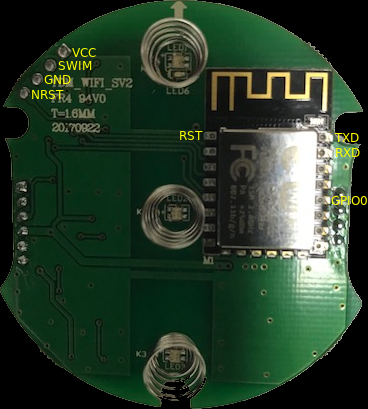
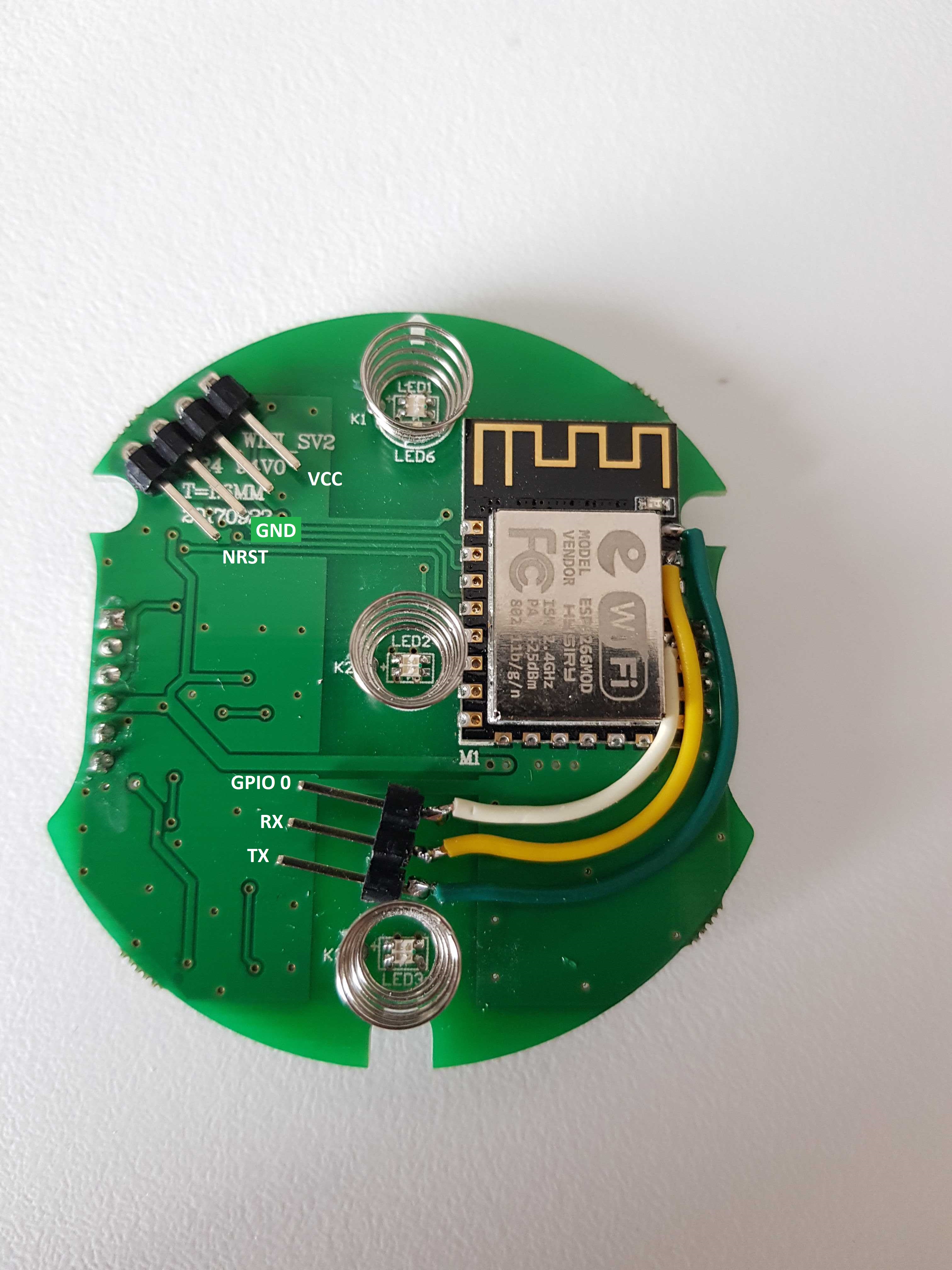
NRST and GPIO0 must be connected to GND for flashing
¶ SONOFF TASMOTA (5V) edition
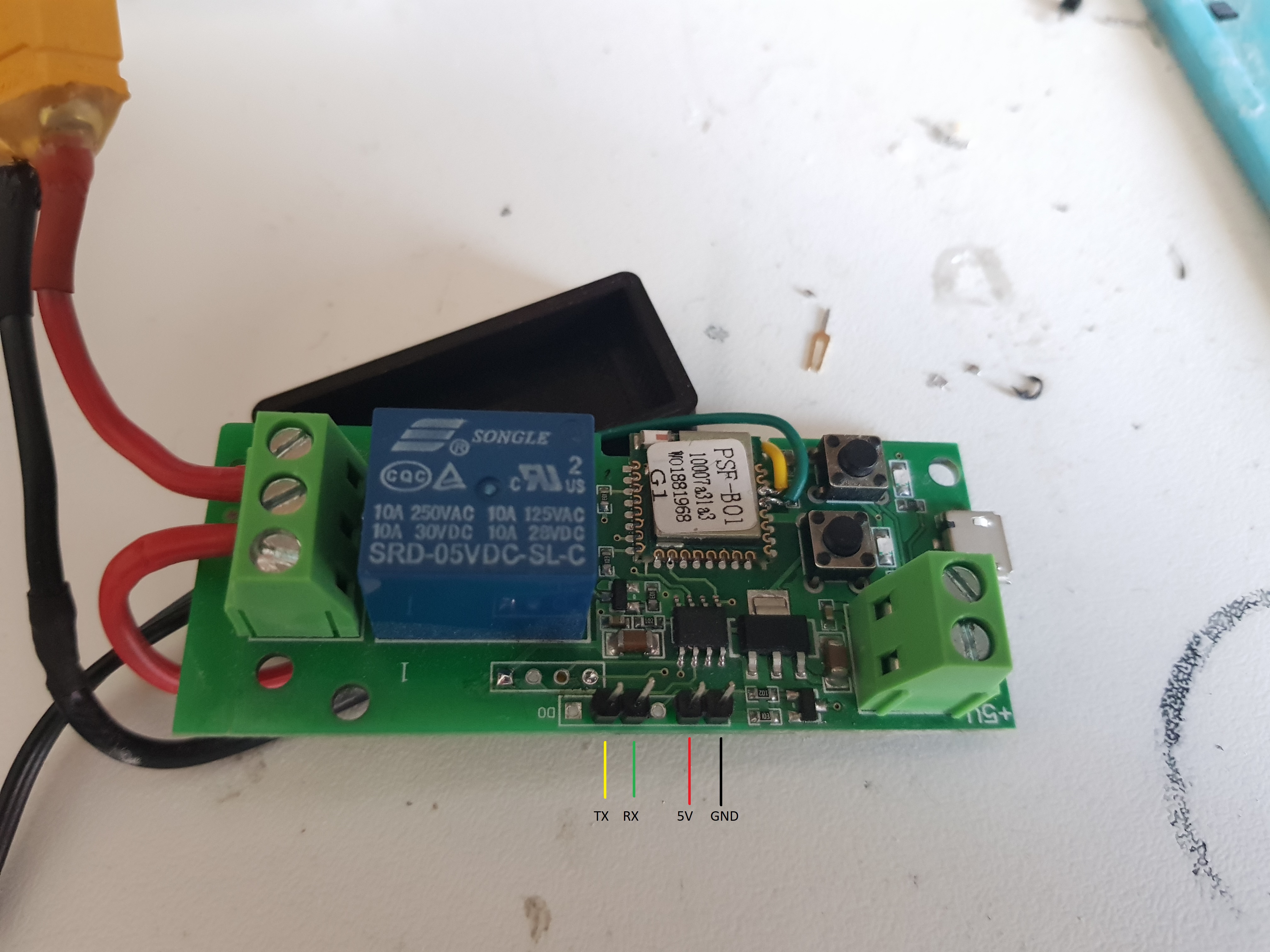
Press both button to boot in flashing mode (relay will click many times, it doesn't matter)
¶ Wifi smartplug brain transplant
Programm an ESP12 or ESP8266 with tasmota
¶ Wiring
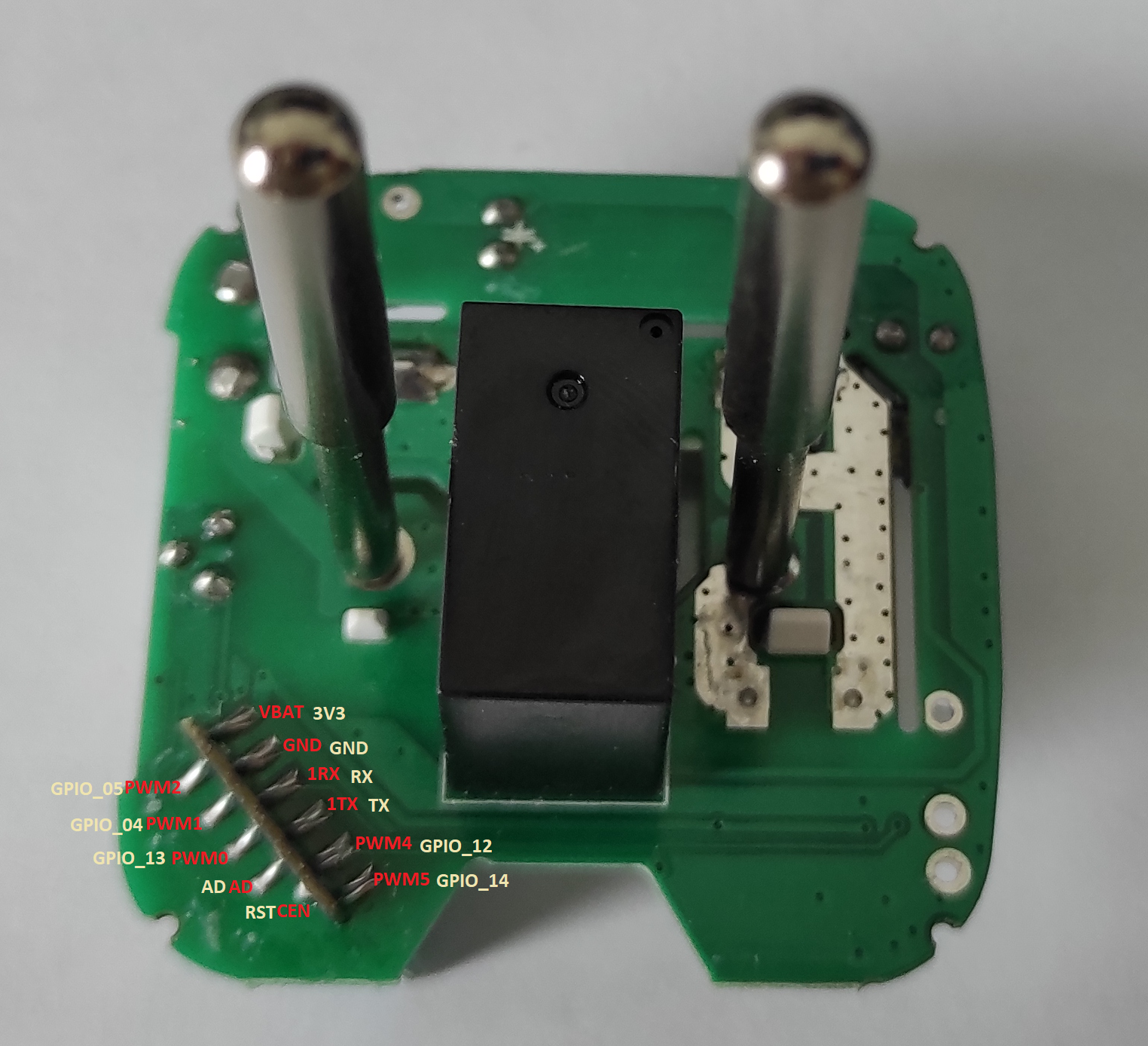
'''EN''' -> '''10k''' -> '''3v3'''
'''IO15''' -> '''GND'''
¶ Tasmota config
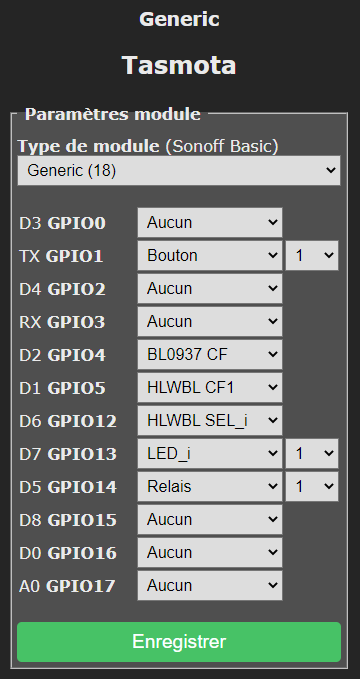
¶ Tasmota calibration
https://tasmota.github.io/docs/Power-Monitoring-Calibration/
¶ Verify the Power reading in the web UI (optionally with the power meter as well) for the expected wattage. Adjust the power offset if needed (in Watts)
PowerSet 60.0
If you're using something other than a 60W bulb, enter your load's power rating
¶ Verify the Voltage reading. Adjust the voltage offset if needed (in Volts)
VoltageSet <voltage>
Replace with your standard voltage or with reading on your multi-meter if you have one. Your voltage will vary depending on the electrical standards and your electrical grid
¶ Verify the Current reading by calculating current value (amperage) using this formula: P(W)/V(V)=I(A). Adjust the current offset if needed (in milliAmps (mA=A*1000))
CurrentSet <current>
Replace with your calculated value (in milliAmps)
¶ NFC/RFID/MIFAR
¶ Devices
¶ RC522
Reader for adruino/esp32 etc.
¶ ACR122U
Reader writer for linux/windows
¶ Lib and installation
¶ Windows
https://github.com/xavave/Mifare-Windows-Tool
¶ Linux
apt-get install -y pcscd pcsc-tools libnfc-bin libnfc-examples libnfc-pn53x-examples mfcuk mfoc
https://oneguyoneblog.com/2016/11/02/acr122u-nfc-usb-reader-linux-mint/
¶ Drivers
https://www.acs.com.hk/en/driver/3/acr122u-usb-nfc-reader/
¶ Errors
*error libnfc.driver.acr122_usb Unable to claim USB interface (Device or resource busy)
service pcscd stop
modprobe -r pn533_usb pn533 nfc
service pcscd start
¶ Tuto copy
Hardenest attack :
Le mieux :
https://blandais.github.io/mifare/fr
https://blog.kveer.fr/comment-copier-un-badge-mifare-classic/
https://mathieu.daitauha.fr/nfc-mifare-classic-1k/
https://www.latelierdugeek.fr/2017/07/12/rfid-le-clone-parfait
¶ Lister les infos de la puce
nfc-list
¶ Extraire les clés de chiffrement de la puce RFID de destination
Pour pouvoir écrire sur une puce RFID, il faut en posséder les clés de chiffrement. Ces clés de chiffrements vont être stockées avec le contenu de la clé, dans un fichier. Ce fichier nous servira lors de l’étape finale pour copier les données de la puce originale sur la puce chinoise.
Pour lancer l’extraction des clés de chiffrement, placez votre puce sur le lecteur et saisissez dans un terminal la commande suivante.
mfoc -P 500 -O carte-vierge.dmp
¶ Copiez le contenu de la puce RFID d’origine
mfoc -P 500 -O carte-originale.dmp
Si mfoc renvoi le message comme quoi il n'a pas trouvé la clef passer à l'étape suivante :
¶ Trouver la clef de la puce RFID d'origine
time mfcuk -C -R 0:A -s 250 -S 250 -v 3 -O carte-originale.dmp
Cela peut prendre aux environs d'une heure.
Si réussite :
[...]
-----------------------------------------------------
Let me entertain you!
    uid: 22dc2b61
   type: 08
    key: 000000000000
  block: 03
diff Nt: 80
  auths: 2237
-----------------------------------------------------

INFO: block 3 recovered KEY: 8829da9daf34
 1 2 3 4 5 6 7 8 9 a b c d e f


ACTION RESULTS MATRIX AFTER RECOVER - UID 22 dc 2b 61 - TYPE 0x08 (MC1K)
---------------------------------------------------------------------
Sector  |    Key A      |ACTS | RESL    |    Key B      |ACTS | RESL
---------------------------------------------------------------------
0       |  8829da9daf76 | . R | . R     |  000000000000 | . . | . .
1       |  000000000000 | . . | . .     |  000000000000 | . . | . .
2       |  000000000000 | . . | . .     |  000000000000 | . . | . .
3       |  000000000000 | . . | . .     |  000000000000 | . . | . .
4       |  000000000000 | . . | . .     |  000000000000 | . . | . .
5       |  000000000000 | . . | . .     |  000000000000 | . . | . .
6       |  000000000000 | . . | . .     |  000000000000 | . . | . .
7       |  000000000000 | . . | . .     |  000000000000 | . . | . .
8       |  000000000000 | . . | . .     |  000000000000 | . . | . .
9       |  000000000000 | . . | . .     |  000000000000 | . . | . .
10      |  000000000000 | . . | . .     |  000000000000 | . . | . .
11      |  000000000000 | . . | . .     |  000000000000 | . . | . .
12      |  000000000000 | . . | . .     |  000000000000 | . . | . .
13      |  000000000000 | . . | . .     |  000000000000 | . . | . .
14      |  000000000000 | . . | . .     |  000000000000 | . . | . .
15      |  000000000000 | . . | . .     |  000000000000 | . . | . .

INFO: saved extended tag dump file to 'carte-originale.dmp'

real    23m23,994s
user    0m3,922s
sys     0m10,084s
¶ Dump du badge avec la clef que l'on vient de trouver
time mfoc -O carte-originale.mfd -k 8829da9daf34
¶ En cas de suspicion de protection par compteur sur le badge
Refaire un dump après avoir rebadgé.
hexdump carte-originale-2.mfd > hexdump_2.dmp
hexdump carte-originale.mfd > hexdump.dmp
diff hexdump.dmp hexdump_2.dmp
Si le diff ne montre aucune différence. Il n'y a pas de protection par compteur.
¶ Ecrire le contenu de la puce originale sur la puce de destination
nfc-mfclassic W a <carte a copier>.<dmp|mfd> <carte vierge>.<dmp|mfd>
In case of
Expected MIFARE Classic card with UID starting as: 9a6c8136
Got card with UID starting as:                     00000000
Aborting!
nfc-mfclassic W a <carte a copier>.<dmp|mfd> <carte vierge>.<dmp|mfd> f
Option f force writing when uid is not the same
¶ ESP 8266/32
¶ Pinouts
ESP8266 (doit)
https://www.sigmdel.ca/michel/ha/esp8266/doit_nodemcu_v3_en.html
ESP8266 (weemos d1 mini)
https://escapequotes.net/esp8266-wemos-d1-mini-pins-and-diagram/
¶ Onboard LEDS
- GPIO2 (d4) devkit led , coding reference : 2, D4
- GPIO16 (d0) nodemcu led, coding reference : 16, D0, LED_BUILTIN, BUILTIN_LED
https://lowvoltage.github.io/2017/07/09/Onboard-LEDs-NodeMCU-Got-Two
¶ Rfid reader
https://github.com/nkolban/esp32-snippets/blob/master/cpp_utils/MFRC522.cpp
¶ Téléinfo
https://faire-ca-soi-meme.fr/domotique/2016/09/12/module-teleinformation-tic/
http://sarakha63-domotique.fr/nodemcu-teleinformation-wifi/
¶ RJ45
https://esp8266hints.wordpress.com/2018/02/13/adding-an-ethernet-port-to-your-esp-revisited/
¶ Zigbee2mqtt
¶ Raspberry Pi
If dongle keep disconneting IE zigbee2mqtt is not working but a restart of service resolve the trouble.
Try disabling usb autosuspend
On a Raspberry Pi, you will need to instead edit '''/boot/cmdline.txt''' and add '''usbcore.autosuspend=-1''' to the end of the line
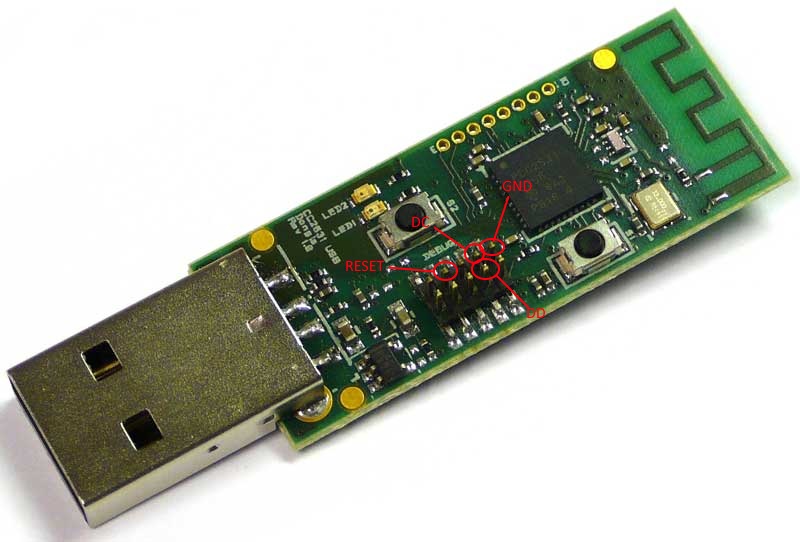
¶ CC debuger emulator(esp8266)
http://www.zigbee2mqtt.io/information/alternative_flashing_methods.html
| PIN PURPOSE | NUMBER ON CC2591 | NUMBER ON WEMOS | ||
|---|---|---|---|---|
| DC (Debug Clock) | P2_2 | D2 (GPIO4) | ||
| DD (Debug Data) | P2_1 | D5 (GPIO14)D6 (GPIO12) | ||
| RST (Reset) | RST | D1 (GPIO5) | ||
| VCC (Supply) | VCC | 3V3 | ||
| GND (Ground) | GND | G |
¶ C2531 Coordinator
¶ Falshing with esp8266
https://blog.zencoffee.org/2019/04/flashing-z-stack-on-a-cc2530cc2591-using-a-wemos-d1-mini/
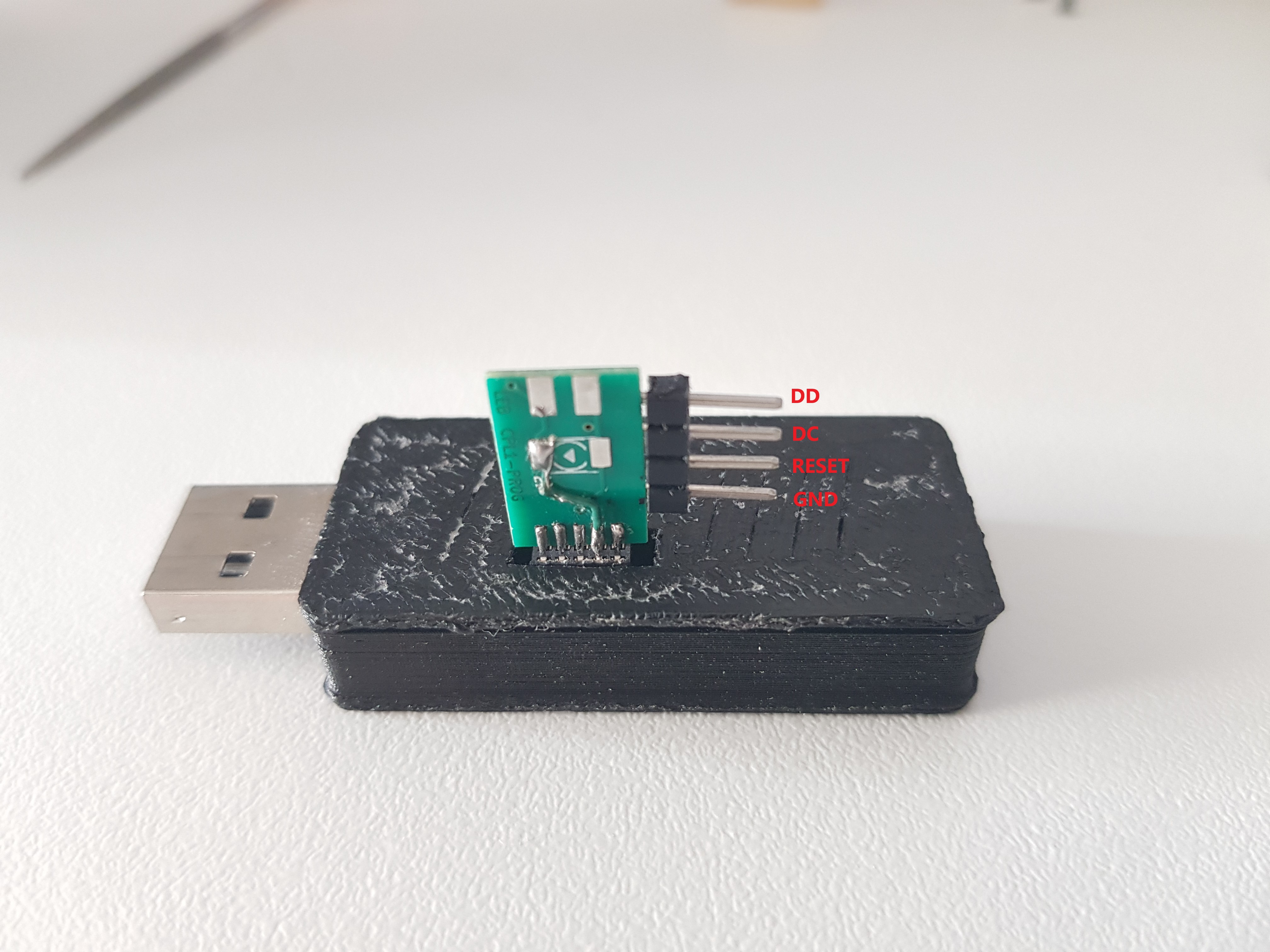
¶ Wiring
¶ Antenna extension
https://hackaday.io/project/163505-cc2531-usb-adapter-antenna-mod

¶ Network map
Dans un client mqtt
S'abonner à :
zigbee2mqtt/bridge/networkmap/graphviz
Publier ''graphviz'' dans:
zigbee2mqtt/bridge/networkmap
Lire le retour dans un lecteur graphviz
http://www.webgraphviz.com/
¶ Problemes
¶ Unbable to write logs
rm -rf /opt/zigbee2mqtt/data/log
¶ LoraTap SC400 curtain switch (TUYA Zigbee model 'TS130F')
¶ Inverting controls to match Home assistant controls
In the zigbee2mqtt configuration file add invert_cover: true for the concerned device
invert_cover: true
¶ Calibration
- Fully open the cover
- Publish 'on' to zigbee2mqtt/my_curtain/set/calibration
- Push the down-button at the switch
- When the cover is fully closed, push the stop-button
- Publish 'off' to zigbee2mqtt/my_curtain/set/calibration
¶ Backlight
zigbee2mqtt/Volet atelier/set/backlight_mode
¶ Values
- LOW
- HIGH
- MEDIUM
¶ Xiaomi IR remote
https://github.com/AdamKGoddard/XiaomiIR_ESPHome
¶ Windows shutdown (RPC shutdown addon for hassio)
¶ Error '''NT_STATUS_OBJECT_NAME_NOT_FOUND''' and or '''WERR_CALL_NOT_IMPLEMENTED'''
¶ Ensure network discovery is enabled
¶ Enable RemoteRegistry
reg add HKLM\SOFTWARE\Microsoft\Windows\CurrentVersion\Policies\System /v LocalAccountTokenFilterPolicy /t REG_DWORD /d 1
sc config RemoteRegistry start= auto
sc start RemoteRegistry